Speaker management is mostly copying. A bio arrives in an email and is pasted into the website. A photo arrives as a phone screenshot and is cropped by somebody on the team. The slides arrive five minutes before the session, on a USB stick, and are uploaded to the agenda the next day if anyone remembers.
Every one of those steps exists only because the speaker could not do it themselves. evenclo gives each speaker a page where they can.
One link, no password
From the speakers list, the organiser presses Send link. The speaker gets an email, opens it, and is in. There is no account to create and no password to forget. Sending a new link stops the old one working, which is also how you cut off a link that went to the wrong address. Speakers can request a fresh link themselves, and that page answers the same way whether or not the address belongs to a speaker, so it cannot be used to find out who is on the programme.
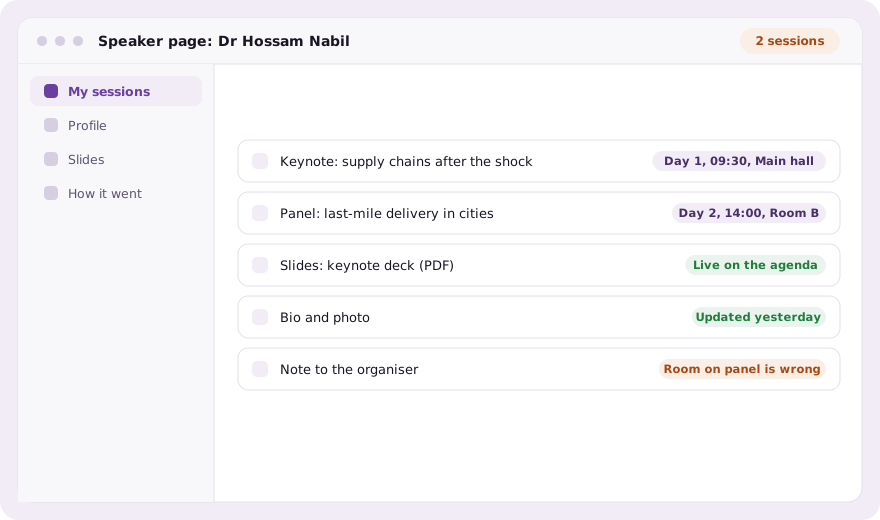
What a speaker can change, and what they cannot
- Their profile: name, title, organisation, bio and photo, in English and Arabic
- Slides and handouts for their sessions, live on the agenda and in the app on upload
- A note asking the organiser to fix a session, which emails the owners and admins
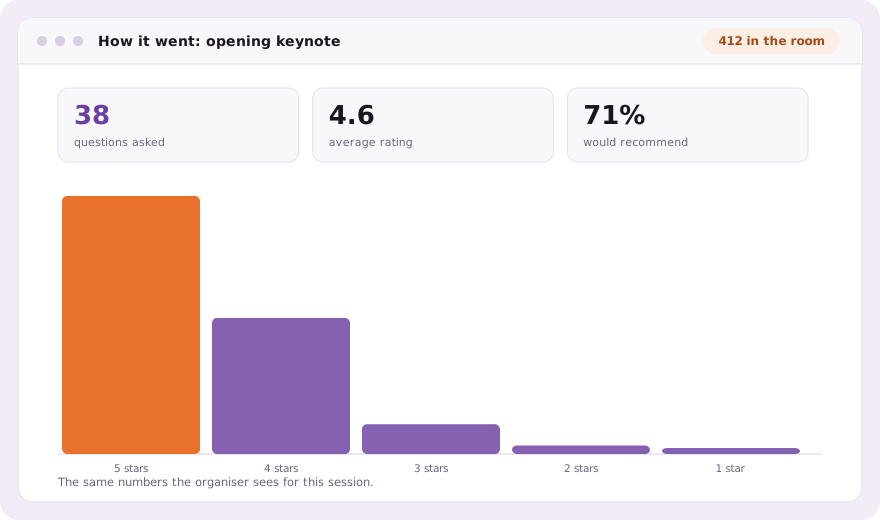
- Afterwards, the questions the room saw in Q&A and the results of polls and feedback
Sessions are read-only to speakers. Renaming a talk or moving its time would break the printed programme, the agenda page and every attendee’s saved schedule, so a speaker asks and the organiser decides. The note lands at the top of the agenda with the session beside it.
One profile, two doors
The speaker edits the same profile the organiser edits on the speakers list, not a copy waiting to be approved. Whoever saves last wins, which is how it already works when a speaker emails a correction. A deck uploaded by the speaker is the deck attendees download from the agenda, so nobody uploads it again on their behalf.
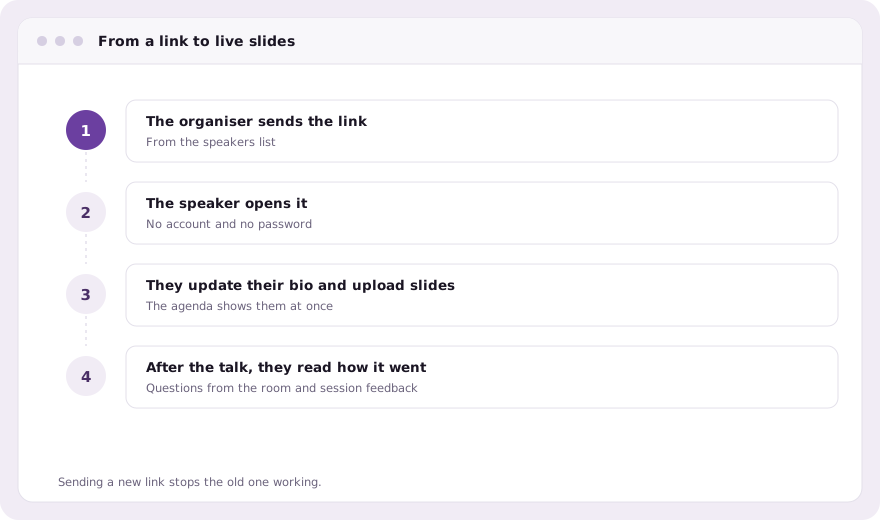
For the organiser, the result is a speakers list that is current without anyone chasing it. The photo on the website is the one the speaker chose, the bio is the length they wrote, and the deck on the agenda is the final one rather than the draft they sent in March.
In the attendee app as well
Most speakers are also registered for the event, so they already carry the attendee app. A speaker signed in there sees the same screens in a speaker tab, and the badge QR code, which anybody can photograph, is deliberately not enough to open them.
Common questions
Do speakers need an account or a password?
No. They open an emailed link. Sending a new link stops the old one working.
Can speakers change their session title or time?
No. Sessions are read-only to speakers; they send the organiser a note, and the organiser makes the change.
Do uploaded slides go on the agenda automatically?
Yes. Slides a speaker uploads appear on the public agenda and in the attendee app as soon as they are uploaded.
Book a demo Thirty minutes, screen shared, in Arabic or English.